
Disc Wizard: Difference between revisions
More actions
| Line 4: | Line 4: | ||
* Button triggers NMI | * Button triggers NMI | ||
* 8K ROM data has 4 regions. There is an NMI vector at &0066, &0866, &1066 and &1866 | * 8K ROM data has 4 regions. There is an NMI vector at offsets &0066, &0866, &1066 and &1866 within the ROM data. This suggests each of the 4 regions is selectable and mappable into the range &0000-&7ff. | ||
What is not clear is that when the chosen region is mapped into the Z80 memory space if the region in &0000-&7ff is repeated through to the end of &3fff. | |||
- Region 0 appears to be for saving "DraySoftONE". | |||
- Region 1 appears to be for loading "DraySoftONE" | |||
- Region 2 appears to be saving for "DraysoftTWO". | |||
- Region 3 appears to be for loading "DraysoftTWO" | |||
* | It seems that the "1/2" switch on the PCB chooses between which 4k (assumption it is connected to A12 of the EPROM), then the "load/save" switch chooses between the 2k within that 4k (assumption it is connected to A11 of the EPROM). | ||
* | |||
* Dissassembly of the code indicates it uses direct FDC disc access for loading/saving. | |||
* Dissassembly of the code indicates it uses an I/O port &f0e0, and sends the data 0,1,2 or 3. It is not clear the function or the exact decoding of this port. | |||
== Pictures == | == Pictures == | ||
Revision as of 08:22, 14 August 2013
The Disc Wizard was an addon from Draysoft & Evesham Micro Centre that allowed you to make dumps of the CPC memory to external storage, pretty much like the Multiface and similar interfaces.
Technical
- Button triggers NMI
- 8K ROM data has 4 regions. There is an NMI vector at offsets &0066, &0866, &1066 and &1866 within the ROM data. This suggests each of the 4 regions is selectable and mappable into the range &0000-&7ff.
What is not clear is that when the chosen region is mapped into the Z80 memory space if the region in &0000-&7ff is repeated through to the end of &3fff.
- Region 0 appears to be for saving "DraySoftONE". - Region 1 appears to be for loading "DraySoftONE" - Region 2 appears to be saving for "DraysoftTWO". - Region 3 appears to be for loading "DraysoftTWO"
It seems that the "1/2" switch on the PCB chooses between which 4k (assumption it is connected to A12 of the EPROM), then the "load/save" switch chooses between the 2k within that 4k (assumption it is connected to A11 of the EPROM).
- Dissassembly of the code indicates it uses direct FDC disc access for loading/saving.
- Dissassembly of the code indicates it uses an I/O port &f0e0, and sends the data 0,1,2 or 3. It is not clear the function or the exact decoding of this port.
Pictures
- Draysoft & Evesham Micro Centre Disc Wizard
-
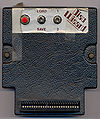 Front View
 -
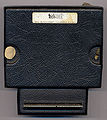 Back View
 -
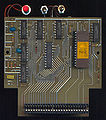 PCB Top
 -
 PCB_Bottom


- better pics by Terje Grind
-
 Front View
 -
 Back View
 -
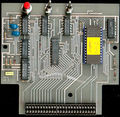 PCB Top
 -
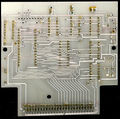 PCB_Bottom


Manual
Download
- DiscWizard v1.2 zipped ROM file (ROM image for Emulators)
Links
- Disc Wizard at the English-language Wikipedia (Disc Wizard is mentioned in the Multiface's Similar products section)